

By Clark Mago
Determining your Google Ads budget requires balancing growth goals, target cost-per-lead, and expected ROI. By analyzing historical performance, market competition, and conversion value, businesses can set a budget that maximizes revenue while avoiding wasted spend.
Your Google Ads budget should align with your revenue goals, target audience, and conversion cost. Start by calculating your ideal cost-per-lead, estimate the monthly leads you need, and adjust for competition and seasonal trends to ensure every dollar drives measurable growth.
Why Setting the Right Google Ads Budget Matters

A Google Ads budget isn’t just a number—it’s the engine that powers predictable revenue. In 2026, with AI-driven search and evolving privacy rules, businesses need a precise strategy that:
- Ensures your brand appears as the preferred answer in AI-assisted search.
- Converts clicks into real customers, not bot traffic.
- Provides transparent ROI, so you see exactly what your ad spend delivers.
Setting the right budget means focusing on results, not vanity metrics like traffic volume.
In this guide, we’ll explore key factors to consider when determining your Google Ads budget and how to maximize your return on investment (ROI).
1. Define Your Advertising Goals
Your Google Ads budget should align with your business objectives. Different goals require different levels of investment:
- Brand Awareness: $500–$2,000/month for display and YouTube ads.
- Lead Generation: $2,000–$10,000/month, depending on industry competition.
- E-commerce Sales: $5,000–$20,000/month to drive direct conversions.
- Competitive Industry Domination: $10,000+/month for high-competition keywords.
2. Understand Cost Per Click (CPC) in Your Industry
The cost of running Google Ads varies based on industry competition. Here are some average CPC benchmarks:
- Legal Services: $6–$15 per click
- Healthcare: $3–$8 per click
- Real Estate: $1–$5 per click
- E-commerce: $0.50–$2 per click
- B2B SaaS: $3–$10 per click
Budget Estimation Formula:
(Target Clicks per Month) x (Average CPC) = Estimated Google Ads Budget Example: If your goal is 1,000 clicks per month with an average CPC of $5, your estimated budget would be $5,000/month.
3. Consider Conversion Rates & Customer Acquisition Costs
Your Google Ads budget should account for conversion rates and the cost of acquiring new customers.
Example Calculation:
- CPC: $4
- Conversion Rate: 5%
- Leads per 100 clicks: 5
- Cost Per Lead: $4 x 20 clicks = $80
If your average customer value is $500, spending $80 per lead can be profitable.
4. Start with a Scalable Budget
If you’re new to Google Ads, begin with a test budget and adjust based on performance.
- Start Small: $1,000–$3,000/month to analyze results.
- Optimize Ads: Improve ad copy, targeting, and landing pages.
- Scale Up: Increase budget once you see a positive ROI.
5. Monitor and Adjust Regularly
Google Ads requires ongoing monitoring and optimization. Track these key metrics to ensure efficiency:
- Click-Through Rate (CTR): Measures ad engagement.
- Cost Per Click (CPC): Helps control spending.
- Conversion Rate: Indicates lead or sale effectiveness.
- Return on Ad Spend (ROAS): Evaluates profitability.
Step-by-Step Strategy for a High-Impact Google Ads Budget
Step 1: Define Your Business Goals and KPIs
Before allocating any budget, clearly define:
- Revenue Targets: How much new business do you need to generate per month?
- Lead Goals: How many qualified leads will meet those revenue targets?
- Cost per Acquisition (CPA): What is a profitable cost to acquire a customer?
Example: If your goal is $150,000 in monthly revenue and your average deal is $5,000, you need 30 new clients. If your target CPA is $500, your monthly Google Ads budget should be around $15,000.
Step 2: Analyze Historical Performance
Use past data to make informed decisions:
- Conversion Rates: Determine which campaigns, keywords, or audiences convert best.
- Cost per Click (CPC): Identify average CPC in your niche.
- Lead Quality: Track which ads deliver customers, not just inquiries.
If historical data is limited, start with a test budget of 10–20% of projected monthly revenue to validate assumptions.
Step 3: Account for Market Competition
Competition drives costs:
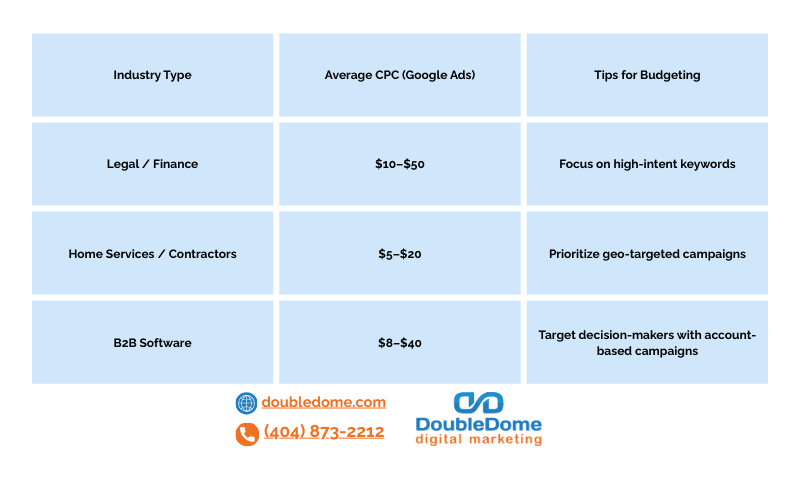
High competition = higher CPC = larger budget needed to maintain visibility and win qualified leads.
Step 4: Estimate Monthly Budget Using Formulas
A simple formula to estimate a Google Ads budget:
Budget=Target Leads per Month×Target CPA
Example:
- Target Leads: 50/month
- Target CPA: $300/lead
Monthly Budget: 50 × $300 = $15,000
Adjust monthly based on seasonal trends, ad performance, and conversion data.
Step 5: Factor in AI-Driven Search & Conversion Optimization
AI-powered search in 2026 means:
- You may appear in answer boxes without clicks. Budget should prioritize high-value actions over raw traffic.
- Optimize campaigns for conversions and engagement, not just clicks.
- Regularly review which keywords, ads, and landing pages generate measurable revenue.
Smart budget allocation ensures your business becomes the “obvious choice” for leads, regardless of search engine changes.
Step 6: Monitor, Adjust, Repeat
A Google Ads budget is dynamic:
- Track cost-per-conversion weekly.
- Reallocate budget to high-performing campaigns.
- Pause underperforming ads to reduce waste.
The goal: a self-sustaining growth system where every dollar spent moves the needle on revenue.
Conclusion
Your Google Ads budget should be strategic, data-driven, and flexible. Start with a reasonable budget, analyze performance, and scale up as you see results.
Need expert help to optimize your Google Ads budget? Let’s discuss how we can maximize your ad spend for the best ROI!
Stop guessing and start owning your growth. DoubleDome Digital Marketing helps businesses set and optimize the right Google Ads budget to maximize ROI, deliver high-quality leads, and future-proof your ad strategy. Schedule your consultation today.
FAQ Section
What is the minimum Google Ads budget for a small business?
Most small businesses start with $500–$1,000 per month to test and optimize campaigns.
How often should I review my Google Ads budget?
Weekly or bi-weekly to ensure spend aligns with conversion performance and market trends.
Can a higher budget guarantee better results?
Not necessarily; effectiveness depends on targeting, ad quality, and conversion optimization.
How do AI answer engines affect my ad spend?
You may get fewer clicks but still gain leads; focus on conversions, not raw traffic.
Should I include remarketing in my budget?
Yes—remarketing typically drives higher ROI at a lower cost per conversion.